Difference Between ERP I and ERP II: Evolution, Systems, And Future Scope
Introduction
The difference between ERP I and ERP II becomes clear when you look at how businesses operate today versus how they worked earlier.
Traditional ERP systems were built to manage internal processes efficiently. But modern businesses depend on suppliers, partners, and customers just as much as internal teams. That shift is exactly why ERP II came into the picture.
Lets understand this evolution of traditional ERP to modern one in detail here.

Difference Between ERP I And ERP II
ERP I refers to the traditional, internally focused enterprise software that most large companies adopted in the 1990s. Its main job was to streamline internal functions like finance,inventory, production, and HR & payroll within a single system.
ERP II is the next stage of ERP, designed for a connected business environment. It is web-based and built to support collaboration beyond the organisation. Along with internal teams, it connects suppliers, customers, logistics partners, and other stakeholders.
Here is the difference between traditional ERP and ERP 2:
AConnectivity and access
ERP I works mostly within the company network and is limited to internal users. ERP II is web-based , allowing controlled access to vendors, distributors, and customers.
Scope of work
ERP I system focuses on internal efficiency. ERP II expands that focus to the entire value chain, including supply chains and customer ecosystems.
Data usage and flow
ERP I data is created and used internally. Information stays inside departments. ERP II data is shared, published, and subscribed across the business ecosystem in real time.
Because of this shift, ERP II is not just a system upgrade. It represents a business transformation, where data, processes, and decisions flow across organisational boundaries in real time.
Scalability and adaptability
ERP I struggles when businesses expand geographically or digitally. So, given the market needs and globalization factor, ERP 2 came into existence. It is built to scale with global operations.
ERP I Vs ERP II In Terms Of Business Scope And Connectivity
Here's the simplest way to understand it:
ERP 1 = Internal focus
ERP 2 = Internal + External connections
With ERP I, optimisation happens only inside the company. Data is created, used, and stored internally. Departments work better together, but external partners remain disconnected.
ERP II changes this approach. Data is shared securely with suppliers, customers, and partners. Forecasts, orders, inventory levels, and delivery schedules move across systems without manual intervention.
This real-time collaboration changes workflows completely. Instead of reacting late to issues, businesses can plan better, respond faster, and coordinate decisions across the supply chain.That connectivity is the real difference between ERP I and ERP II.
What Is ERP II And How Does It Differ From Traditional ERP Systems
ERP II or ERP 2 is the evolved version of traditional ERP. Think of it as an ERP that no longer works only inside the company, but also connects outside stakeholders
The traditional ERP, as we know, is limited to internal operations like finance, inventory,production, and HR.
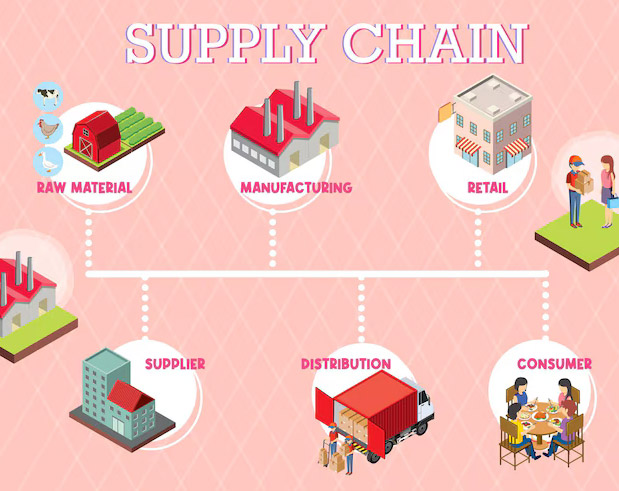
ERP II goes a step further. It manages suppliers, customers, distributors, and partners into the same digital flow. That is multiple stakeholders connected all together for better collaboration.And this collaboration, in turn, helps businesses respond faster and reduce delays across the supply chain.
Besides, the data in ERP 2 is shared, published, and subscribed both inside and outside the organisation.
For example, when demand changes:
Suppliers see updated requirements
Logistics partners adjust schedules
Sales teams get real-time availability
This constant data flow is what makes ERP II more flexible and business-driven, not just system-driven. Below is a quick glance of difference between ERP 1 and ERP 2:
| Aspect | ERP | ERP II |
|---|---|---|
| Focus | Internal operations | nternal + external collaboration |
| Data usage | Generated and consumed internally | Shared internally and externally |
| Connectivity | Closed and department-focused | Open, web-based, and connected |
| Scope | Manufacturing and distribution | All industries and business segments |
| Business role | Operational efficiency | Business collaboration and value creation |

How Did ERP Evolve From ERP I To ERP II Over Time
ERP I worked great for a while. Companies got organized internally. Finance, HR, manufacturing, and sales all ran on one system. Life was good.
But then businesses hit a wall.
The problem? ERP I only talked to itself. It didn't care about what was happening outside the company. And in the real world, business doesn't happen in isolation.
Here were the limitations of ERP 1:
Suppliers were blind. You check inventory in the warehouse to know if you need more raw materials. Now, your supplier doesn't know about it. So, someone had to call, send an email, or fax (yes, fax) an order. By the time the supplier processed it, you were already behind schedule.
Customers were frustrated. They placed an order and then... silence. No tracking. No updates. They had to call customer service just to ask, "Where's my order?”
Partners couldn't collaborate. If you worked with distributors or retail partners, they had no visibility into your inventory. They would over-order (tying up cash) or under-order (running out of stock). Everyone was guessing
Then,globalization happened. Companies weren't just working with local suppliers. They were sourcing from China, selling to Europe, and partnering with distributors across three continents.Managing all that through emails and phone calls? Impossible.
That’s when ERP II emerged because businesses needed to break down the walls.
How Are ERP I ERP II And ERP III Compared Across Generations
Here's the evolution in one simple table:
| Generation | Focus | Who Uses It? | How It Works | Example |
|---|---|---|---|---|
| ERP I | Internal efficiency | Your employees only | Automates tasks inside your company | Order triggers invoice,inventory update,production schedule—all internal |
| ERP II | External collaboration | Your employees + suppliers + customers + partners | Connects everyone in real-time | Supplier sees low inventory and ships automatically; customer tracks order live |
| ERP III | Intelligent automation | System + humans (AI assists decisions) | Learns patterns,predicts trends,recommends actions | System predicts demand spike, adjusts orders, suggests pricing—before you ask |

What Is The Difference Between ERP 2 And Extended ERP Concepts
Here's where people get confused. Extended ERP and ERP 2 sound similar, but they are not the same thing.
Extended ERP means you are adding capabilities your traditional ERP didn't have, like:
Customer Relationship Management (CRM)
E-commerce platform
Advanced analytics and business intelligence
Product Lifecycle Management (PLM)
You are expanding what the system does.
Use Cases For Extended ERP
1. Retail Company Adding E-Commerce
A store using ERP for e-commerce inventory management adds Shopify. Now they sell online, but suppliers still call to check stock levels. That's Extended ERP, not ERP 2.
2. Manufacturer Adding CRM
A factory tracks production with ERP, then adds Salesforce to manage customer relationships. This adds new functionality , but the data still stays within the company. That’s extended ERP at work.
3. Distributor Adding Analytics
A distributor uses ERP for logistics, then adds Power BI for data insights. Better decisions, same closed system.
ERP 2 means you are changing who can access and share data with the system—suppliers, customers, and partners. You are expanding who connects to it. Let’s understand this with an example.
Suppose a clothing brand uses basic ERP for inventory and finance. Then, over time they add:
A CRM system to track customer preferences
An e-commerce platform for online sales
Analytics software to predict fashion trends
This shows they have extended their ERP with new functions. But it's still mostly internal.That same clothing brand now connects:
Fabric suppliers who see real-time demand and adjust shipments
Retail partners who access inventory levels directly
Customers who track orders and returns through a portal
Now they have moved to ERP 2 for external collaboration. Here is a quick comparison between the extended ERP system and ERP 2:
| Aspect | Extended ERP | ERP 2 |
|---|---|---|
| What changes? | You add more features | You open the system to outsiders |
| Focus | Functional expansion (CRM, analytics,etc.) | Connectivity and collaboration |
| Who benefits? | Your internal teams get better tools | Your partners and customers get access |
| Architecture | Modular add-ons | Web-based, collaborative platform |
In simple words, Extended ERP can be seen as a functional expansion. Meanwhile, ERP II is an architectural and connectivity evolution of the current functions.
What Does ERP EntERPrise Resource Planning Mean As A Base Concept
ERP (enterprise resource planning) software, in simple terms, is the digital backbone of business. It connects all the functions of business together. Before ERP, companies ran different software for different departments. Accounting used one system, HR used another, Warehouse managers used spreadsheets, and sales reps tracked all orders manually.
But with ERP, we now have the core modules for finance, HR & payroll documentation,manufacturing and sales , supply chain, CRM, and more.
For example, a furniture company gets an order for 50 chairs. Earlier, it was done by labour. Now, the ERP system instantly checks inventory, alerts the warehouse if stock is low, schedule production, updates accounting, and notifies shipping. Even an automated email for confirmation of the order is sent to the client. No human intervention is needed as such.
That's the base concept. Every ERP evolution - right from ERP 1, ERP 2, and Extended ERP is built on this foundation.
Frequently Asked Questions About Difference Between ERP I And ERP II
The main difference between erp vs erp 2 is who the system is built for. ERP I is inward-looking. It focuses only on internal teams like finance, HR, manufacturing, and inventory. ERP II goes beyond the four walls. It connects suppliers, customers, partners, and even external systems. Instead of just managing data, it helps businesses collaborate and operate in real time.
ERP I uses a closed, monolithic architecture. All modules live inside one tightly coupled system. ERP II uses an open, service-based architecture. It supports APIs, cloud platforms, web services, and easy integrations with CRMs, supplier portals, analytics tools, and other enterprise applications.